Intraoral Scanning Techniques: Minimizing Errors
As we all know, pretty much everything we do in life has some level of error in it, and in almost every case we work to minimize these errors and the impact of them. Dentistry is no different, and try as we might, we can’t always avoid some level of error.
It’s also safe to say you want to provide your patients with the highest level of care, which means minimizing errors when you can. Introducing new technology and processes into your practice, such as intraoral scanning, are some of the ways you can offer a higher level of care. If you’re using intraoral scanning to replace some or maybe even all the traditional impressions in your office or thinking about it, integrating the following intraoral scanning techniques can help minimize some errors.
Intraoral scanning vs. traditional impressions
As someone who does both intraoral scanning and old-school traditional impressions, I can say both have their pros and cons. While both techniques are quite different from each other, in many ways they also have some similarities.
The biggest similarity is the need for a dry field. For both physically impressing and optical imaging, we get a more accurate record if we have dry surfaces when it comes to the areas we’re capturing. Period, full stop, dryer is better. We all know and can agree in the mouth that having these dry surfaces can be challenging.
The good news: Depending on the type of physical impression material or scanner we’re using, there are variances in just how dry we need things. Alginate, for example, can tolerate and be accurate with more moisture than PVS materials.
The same applies to intraoral scanners. My older scanner, a Carestream 3600 that I just replaced with a Trios 5, required a much drier field. A drier field is always better when it comes to both traditional impressions and scanning.
By the way, if you’re wondering why I still take old-school traditional impressions at times, the answer is simple. While we’re getting close to being able to completely replace physical impressions, for my practice we’re not quite there for everything yet.
Sources of error for intraoral scanners
Outside light sources
This can come from your headlight or operatory light. Your camera is engineered to use a specific wavelength of light to capture your data, and if you flood the field with light from your headlight or operatory light, you’re extremely likely — in fact, you can pretty much bet on it — to have an inaccurate model.
Other sources of light can affect things as well — light reflected off your mouth mirrors or any other reflective surface can also cause problems. The solution is simple: Your “room light” should be fine, so turn off your headlight and/or operatory light, rely solely on the scanner’s light source, and avoid using reflective instruments like mouth mirrors (even the back of them) to refract.
Refraction
Different surfaces reflect and refract light differently, which can confuse the software and introduce significant errors.
Let’s look at Fig. 1. We know that what we’re seeing is not the reality of “what is,” even if that’s how it appears to our eyes. This is due to refraction — the bending of light as it passes through different mediums.
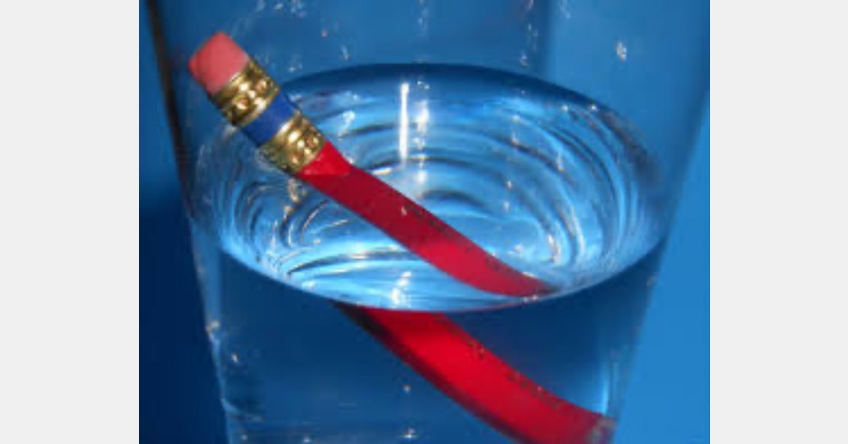
What are our big offenders when it comes to refraction and intraoral scanning? The simple answer is “glass and things like it,” which means enamel and porcelain. Where do enamel and porcelain have the biggest chance of causing issues? Anterior teeth are the simple answer because the edges of them are often all enamel, at least in the case of unworn or minimally worn teeth or porcelain with no dentin underneath.
Overscanning
This is becoming less of an issue as cameras and software improve, but it can still be an issue. While we need to scan and capture everything of interest to some degree, the less scanning we can do while accomplishing that, the better off we are. This means a smaller file size, less strain on the software, and as a result, less chance for the software calculations to introduce error.
A bit of an analogy with traditional impressions would be if you were doing a full-arch case and had to take multiple impressions of that arch to capture all the detail you needed across the arch. Can you use multiple impressions in a manner such as this? Sure, we all have! Is it harder for your ceramist? Absolutely, and it’s very likely to introduce more error because they’re now working across multiple models, which means you’re more likely to have increased adjustments or even worse fit issues at delivery.
The bottom line for both traditional impression and digital scanning: The more efficiently we can capture what we need, the better off we are. We want the “Goldilocks” amount of data capture — not too much, not too little, just enough.
Not following your scanner’s recommended path
This is a BIG one! Your scanner’s software has been designed to work in a certain way that often relies on or at least works best when you acquire the data via whatever path it was designed to follow.
One universal key is to make sure your initial starting point of capture is excellent and free of artifacts and things you don’t want, like tongues, cheeks, and fingers. For me, this means I want to start around the lingual of the second premolars, then roll over the occlusal to the buccal, then move posterior to capture the molars before I move forward towards the anterior. You’ll want to hold the camera shining straight down from the incisal edge, perpendicular to the incisal edge, to minimize the potential for refraction errors and rolling or pitching the camera to get the lingual and buccal.
Last tip! When it comes to the scanning path, always avoid starting your scan path in the anterior if you can because, as we covered above, this area has the highest potential for introducing refraction errors, so it’s typically the worst place to start.
How do errors from intraoral scanners present?
Just as with traditional impressions, the errors with our digital impressions can be both super obvious or almost undetectable until you find something isn’t fitting or working right. Digital impressions do have some uniqueness to them in that sometimes they can have some crazy errors that at first glance could be missed, while their traditional counterparts could never have an error that would present in the same way. This has to do with the software trying to “fix” our scans to create an accurate model for us.
With the scan in Fig. 2, for example, there are some subtle errors I might expect you to notice easily as you closely inspect the scan … but there’s also one giant error.
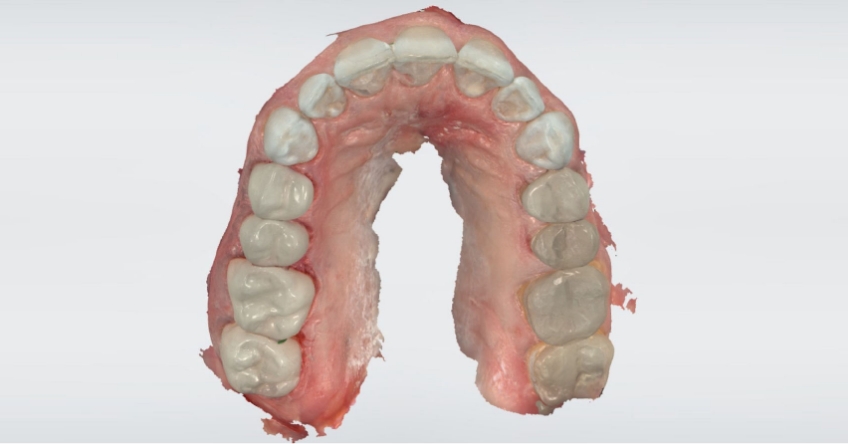
Did you catch it? The computer put in an extra central incisor! Obviously, this could never happen with a traditional impression.
So how did this happen? It was a software error introduced by a poor scan path — due in this case to me trying to scan one side of the arch with an Isodry in place while the patient was sedated, then moving the Isodry to the other side and trying to complete the scan. While you can scan an arch segmentally and get an accurate result, you must “backtrack” to solid known data as you go — if you don’t have enough overlapping data as you move on to the new areas, the odds of the software getting confused and inaccurately stitching the model together skyrockets.
Fig. 3 shows an accurate scan of the same patient.
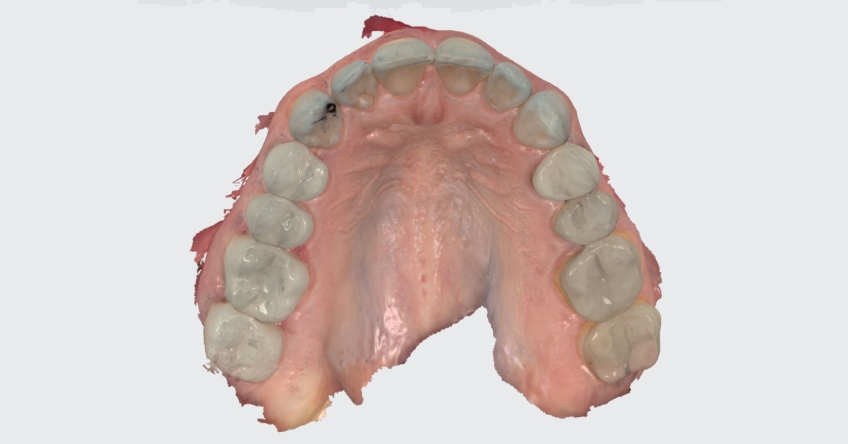
What are some of the “smaller,” more subtle errors in the first scan? The “ditches” shown in Fig. 4, which I knew didn’t exist on the patient’s teeth but were visible in the scan.
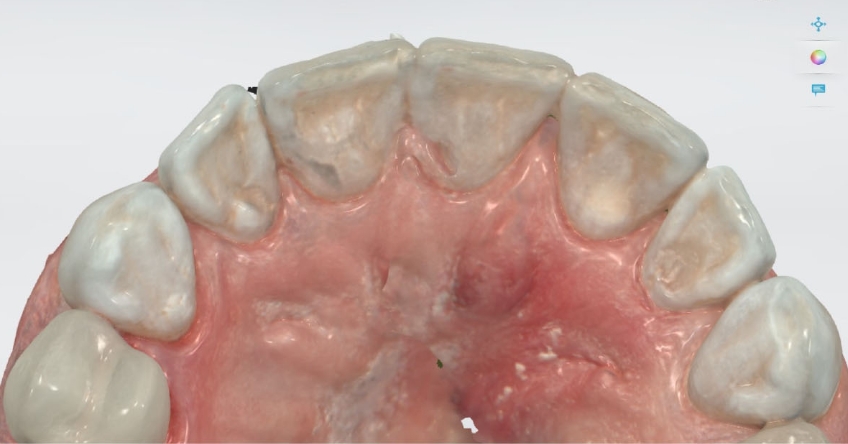
Yes, I noticed those small errors! I was focused on the “trees,” and then as I looked at the “forest” came the realization there was a third central incisor!
Intraoral scanning techniques make a difference
For a final tip: Watch the computer screen as you capture your scan and pay attention to how the data is coming in — it needs to be smooth and flowing. If it’s jumping or misaligning, there’s a good chance you have an inaccurate scan, even if the software seems to correct it.
As you can see from the examples, learning and practicing intraoral scanning techniques will improve the way you see your patients and allow you to provide them with the highest quality of care.
SPEAR campus
Hands-On Learning in Spear Workshops
With enhanced safety and sterilization measures in place, the Spear Campus is now reopened for hands-on clinical CE workshops. As you consider a trip to Scottsdale, please visit our campus page for more details, including information on instructors, CE curricula and dates that will work for your schedule.

By: John Carson
Date: September 28, 2023
Featured Digest articles
Insights and advice from Spear Faculty and industry experts